---
title: Marp slide deck
description: An example slide deck created by Marp CLI
author: Yuki Hattori
keywords: marp,marp-cli,slide
footer: 25/04/2022
_footer: ""
#url: https://marp.app/
#image: https://marp.app/og-image.jpg
# default, gaia, uncover
theme: default
paginate: true
_paginate: false
# Light theme all slides
# First slide, Dark theme for title slide, Title slide style
#class: invert
#_class:
# - invert
# - lead
# Nice preview for the VS Code extension
marp: true
---
Marp
===

##### Markdown presentation ecosystem
###### by Marp Team ([@marp-team][marp-team])
[marp-team]: https://github.com/marp-team
[marpit]: https://github.com/marp-team/marpit
[marp-core]: https://github.com/marp-team/marp-core
[marp-cli]: https://github.com/marp-team/marp-cli
[marp-vscode]: https://github.com/marp-team/marp-vscode
---
# Features
- :memo: **Write slide deck with plain Markdown** (CommonMark)
- :factory: Built on [Marpit framework][marpit]: A brand-new skinny framework for creating slide deck
- :gear: [Marp Core][marp-core]: Easy to start using the core engine and built-in themes via npm
- :tv: [Marp CLI][marp-cli]: Convert Markdown into HTML, PDF, PPTX, and images
* :vs: [Marp for VS Code][marp-vscode]: Live-preview your deck while editting
* and more...
---
# How to write slides?
Split pages by horizontal ruler (e.g. `---`). It's very simple.
```markdown
# Slide 1
foobar
---
# Slide 2
foobar
```
---
# Directives
Marp has extended syntax called **"Directives"** to support creating beautiful slides.
Insert front-matter to the top of Markdown:
```
---
theme: default
---
```
or HTML comment to anywhere:
```html
```
https://marpit.marp.app/directives
---
## [Global directives](https://marpit.marp.app/directives?id=global-directives)
- `theme`: Choose theme
- `size`: Choose slide size from `16:9` and `4:3` *(except Marpit framework)*
- [`headingDivider`](https://marpit.marp.app/directives?id=heading-divider): Instruct to divide slide pages at before of specified heading levels
```
---
theme: gaia
size: 4:3
---
# Content
```
> Marp can use [built-in themes in Marp Core](https://github.com/marp-team/marp-core/tree/master/themes#readme): `default`, `gaia`, and `uncover`.
---
## [Local directives](https://marpit.marp.app/directives?id=local-directives)
These are the setting value per slide pages.
- `paginate`: Show pagination by set `true`
- `header`: Specify the contents for header
- `footer`: Specify the contents for footer
- `class`: Set HTML class for current slide
- `color`: Set text color
- `backgroundColor`: Set background color
---
### Spot directives
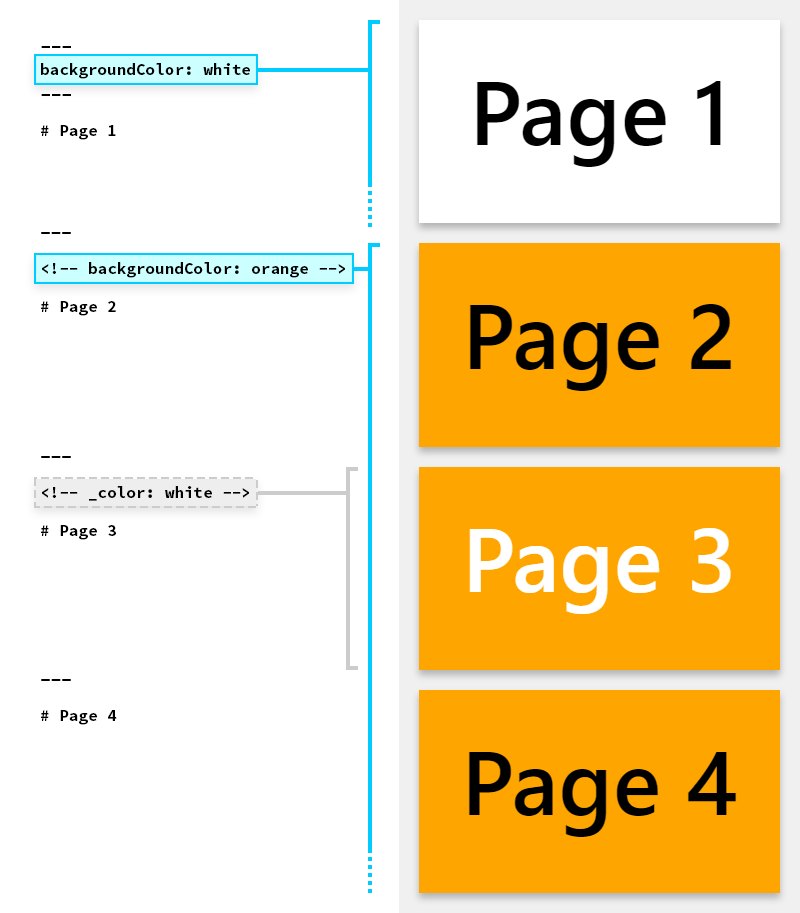
Local directives would apply to **defined page and following pages**.
They can apply to single page by using underscore prefix such as `_class`.
---
### Example
This page is using invert color scheme [defined in Marp built-in theme](https://github.com/marp-team/marp-core/tree/master/themes#readme).
```html
```
---
# [Image syntax](https://marpit.marp.app/image-syntax)
You can resize image size and apply filters through keywords: `width` (`w`), `height` (`h`), and filter CSS keywords.
```markdown

```
```markdown

```
Please refer [resizing image syntax](https://marpit.marp.app/image-syntax?id=resizing-image) and [a list of CSS filters](https://marpit.marp.app/image-syntax?id=image-filters).
 
---
# [Background image](https://marpit.marp.app/image-syntax?id=slide-backgrounds)
You can set background image for a slide by using `bg` keyword.
```markdown

```

---
## Multiple backgrounds ([Marpit's advanced backgrounds](https://marpit.marp.app/image-syntax?id=advanced-backgrounds))
Marp can use multiple background images.
```markdown



```
Also can change alignment direction by including `vertical` keyword.



---
## [Split background](https://marpit.marp.app/image-syntax?id=split-backgrounds)
Marp can use [Deckset](https://docs.deckset.com/English.lproj/Media/01-background-images.html#split-slides) style split background(s).
Make a space for background by `bg` + `left` / `right` keywords.
```markdown

```

---
## [Fragmented list](https://marpit.marp.app/fragmented-list)
Marp will parse a list with asterisk marker as the fragmented list for appearing contents one by one. (_**Only for exported HTML** by [Marp CLI][marp-cli] / [Marp for VS Code][marp-vscode]_)
```markdown
# Bullet list
- One
- Two
- Three
---
# Fragmented list
* One
* Two
* Three
```
---
## Math typesetting (only for [Marp Core][marp-core])
[KaTeX](https://katex.org/) math typesetting such as $ax^2+bc+c$ can use with [Pandoc's math syntax](https://pandoc.org/MANUAL.html#math).
$$I_{xx}=\int\int_Ry^2f(x,y)\cdot{}dydx$$
```tex
$ax^2+bc+c$
```
```tex
$$I_{xx}=\int\int_Ry^2f(x,y)\cdot{}dydx$$
```
---
## Auto-scaling (only for [Marp Core][marp-core])
*Several built-in themes* are supported auto-scaling for code blocks and math typesettings.
```text
Too long code block will be scaled-down automatically. ------------>
```
```text
Too long code block will be scaled-down automatically. ------------------------>
```
```text
Too long code block will be scaled-down automatically. ------------------------------------------------>
```
---
##### Auto-fitting header (only for [Marp Core][marp-core])
##### is available by annotating `` in headings.
```html
## Auto-fitting header (only for Marp Core)
```
---
## [Theme CSS](https://marpit.marp.app/theme-css)
Marp uses `` as the container of each slide. And others are same as styling for plain Markdown. The customized theme can use in [Marp CLI][marp-cli] and [Marp for VS Code][marp-vscode].
```css
/* @theme your-theme */
@import 'default';
section {
/* Specify slide size */
width: 960px;
height: 720px;
}
h1 {
font-size: 30px;
color: #c33;
}
```
---
## [Tweak style in Markdown](https://marpit.marp.app/theme-css?id=tweak-style-through-markdown)
`
Re-painted yellow background, ha-ha.
```
> You can also add custom styling by class like `section.custom-class { ... }`.
> Apply style through ``.
---
## [Scoped style](https://marpit.marp.app/theme-css?id=scoped-style)
If you want one-shot styling for current page, you can use `

```
---
# Enjoy writing slides! :v:
#####  Marp: Markdown presentation ecosystem — https://marp.app/
###### by Marp Team ([@marp-team][marp-team])