
This is the repository for the training Learning Fortran
 Pierre-Yves Barriat
53dae0cfb7
Typo
Pierre-Yves Barriat
53dae0cfb7
Typo
|
3 年之前 | |
|---|---|---|
| assets | 3 年之前 | |
| notebooks | 4 年之前 | |
| src | 3 年之前 | |
| .gitignore | 4 年之前 | |
| LICENSE | 4 年之前 | |
| README.md | 3 年之前 |
README.md
learning-fortran
This is the repository for the training Learning Fortran
Instructor
Pierre-Yves Barriat
CISM/CÉCI Training Sessions
Fortran : shall we start ?
- You know already one computer language ?
- You understand the very basic programming concepts :
- What is a variable, an assignment, function call, etc.?
- Why do I have to compile my code?
- What is an executable?
- You (may) already know some Fortran ?
- How to proceed from old Fortran, to much more modern languages like Fortran 90/2003 ?
Why to learn Fortran ?
- Because of the execution
speedof a program - Well suited for numerical computations : more than 45% of scientific applications are in Fortran
Fastcode : compilers can optimize well- Optimized
numerical librariesavailable - Fortran is a
simplelangage and it is (kind-of)easy to learn
Fortran is simple
- We want to get our science done! Not learn languages!
- How easy/difficult is it really to learn Fortran ?
- The concept is easy: variables, operators, controls, loops, subroutines/functions
- Invest some time now, gain big later!
History
FORmula TRANslation
invented 1954-8 by John Backus and his team at IBM
- FORTRAN 66 (ISO Standard 1972)
- FORTRAN 77 (1978)
- Fortran 90 (1991)
- Fortran 95 (1997)
- Fortran 2003 (2004) →
"standard" version - Fortran 2008 (2010)
- Fortran 2018 (11/2018)
Starting with Fortran 77
- Old Fortran provides only the absolute minimum!
- Basic features : data containers (integer, float, ...), arrays, basic operators, loops, I/O, subroutines and functions
- But this version has flaws: no dynamic memory allocation, old & obsolete constructs, “spaghetti” code, etc.
- Is that enough to write code ?
Fortran 77 → Fortran >90
- If Fortran 77 is so simple, why is it then so difficult to write good code?
- Is simple really better? ⇒ Using a language allows us to express our thoughts (on a computer)
- A more sophisticated language allows for more complex thoughts
- More language elements to get organized ⇒ Fortran 90/95/2003 (recursive, OOP, etc)
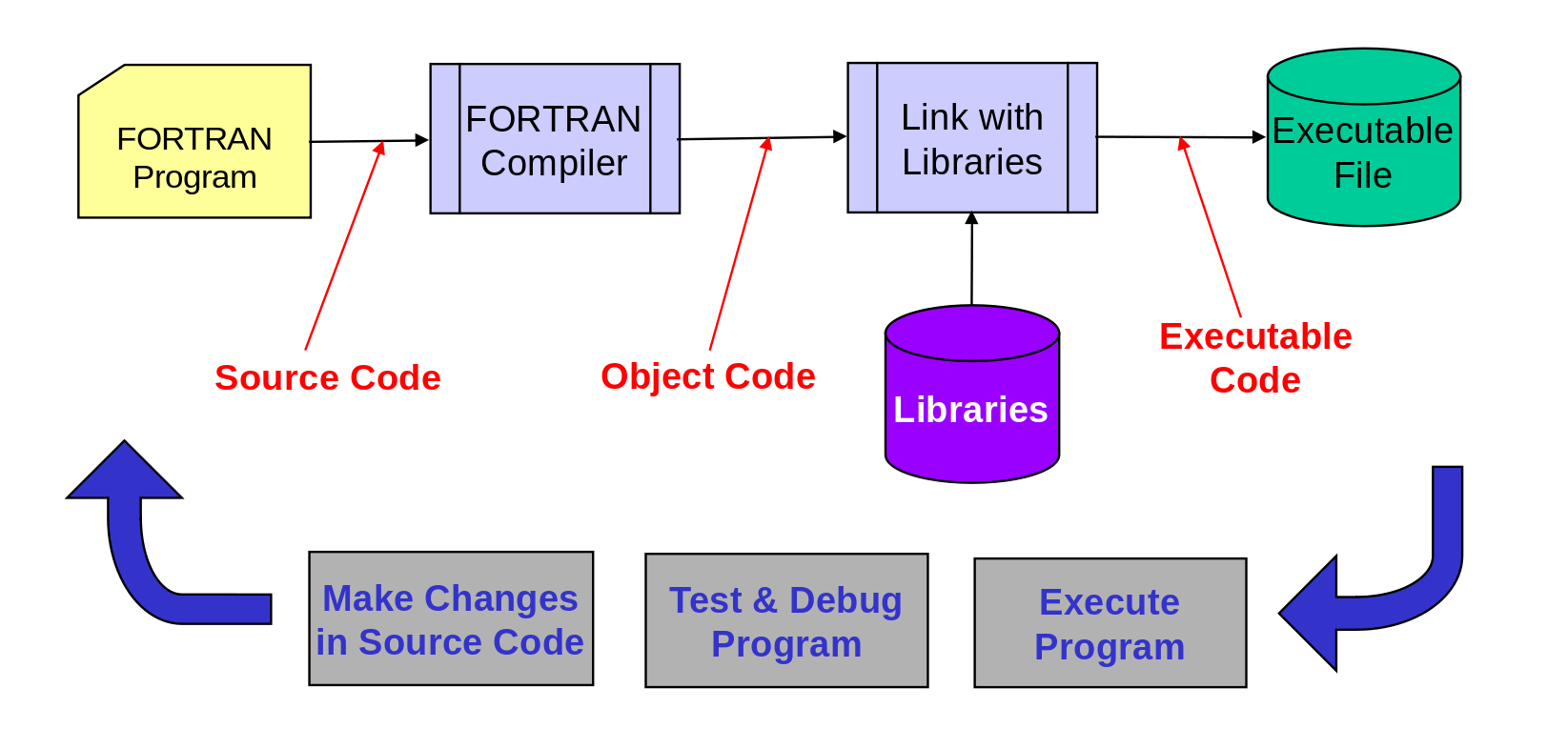
How to Build a FORTRAN Program
FORTRAN is a compiled language (like C) so the source code (what you write) must be converted into machine code before it can be executed (e.g. Make command)
Fortran 77 source code hello_world.f
FORTRAN 77 Format
This version requires a fixed format for programs
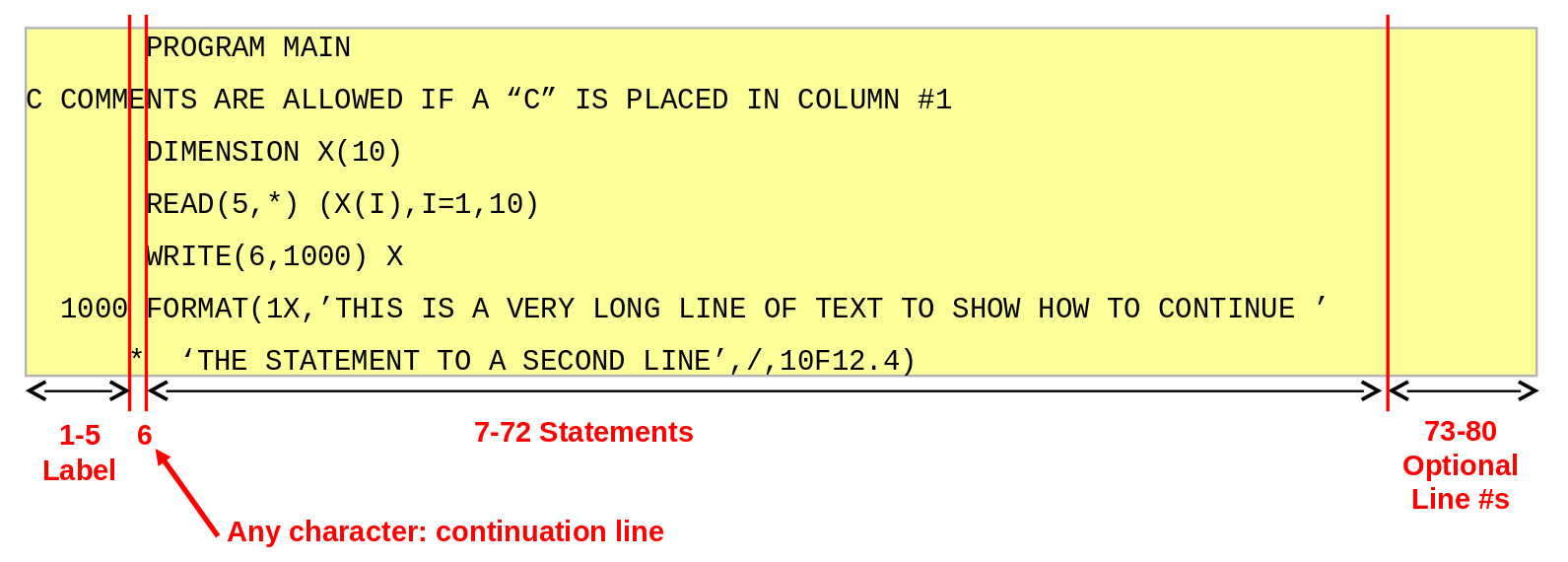
- max length variable names is 6 characters
- alphanumeric only, must start with a letter
- character strings are case sensitive
FORTRAN >90 Format
Versions >90 relaxe these requirements:
- comments following statements (! delimiter)
- long variable names (31 characters)
- containing only letters, digits or underscore
- max row length is 132 characters
- can be max 39 continuation lines
- if a line is ended with ampersand (&), the line continues onto the next line
- semicolon (;) as a separator between statements on a single line
- allows free field input
Program Organization
Most FORTRAN programs consist of a main program and one or more subprograms
There is a fixed order:
Heading
Declarations
Variable initializations
Program code
Format statements

Subprogram definitions
(functions & subroutines)
Data Type Declarations
Basic data types are :
INTEGER: integer numbers (+/-)REAL: floating point numbersDOUBLE PRECISION: extended precision floating pointCHARACTER*n: string with up to n charactersLOGICAL: takes on values.TRUE.or.FALSE.
Data Type Declarations
INTEGER and REAL can specify number of bytes to use
- Default is:
INTEGER*4andREAL*4 DOUBLE PRECISIONis same asREAL*8
Arrays of any type must be declared:
DIMENSION A(3,5)- declares a 3 x 5 arrayCHARACTER*30 NAME(50)- directly declares a character array with 30 character strings in each element
Implicit vs Explicit Declarations
By default, an implicit type is assumed depending on the first letter of the variable name:
A-H, O-Zdefine REAL variablesI-Ndefine INTEGER variables
Can use the IMPLICIT statement:
IMPLICIT REAL (A-Z)
makes all variables REAL if not declared
Implicit vs Explicit Declarations
IMPLICIT CHARACTER*2 (W)
makes variables starting with W be 2-character strings
IMPLICIT DOUBLE PRECISION (D)
makes variables starting with D be double precision
Good habit: force explicit type declarations
IMPLICIT NONE
user must explicitly declare all variable types
Assignment Statements
Old assignment statement: <label> <variable> = <expression>
<label>: statement label number (1 to 99999)<variable>: FORTRAN variable (max 6 characters, alphanumeric only for standard FORTRAN 77)
Expression:
- Numeric expressions:
VAR = 3.5*COS(THETA) - Character expressions:
DAY(1:3) = 'TUE' - Relational expressions:
FLAG = ANS .GT. 0 - Logical expressions:
FLAG = F1 .OR. F2
Numeric Expressions
Arithmetic operators: precedence: ** (high) → - (low)
| Operator | Function |
|---|---|
** |
exponentiation |
* |
multiplication |
/ |
division |
+ |
addition |
- |
subtraction |
Numeric Expressions
Numeric expressions are up-cast to the highest data type in the expression according to the precedence:
(low) logical → integer → real → complex (high)
and smaller byte size (low) to larger byte size (high)
Examples:
Fortran 77 source code arith.f Fortran 77 source code sphere.f
Character Expressions
Only built-in operator is Concatenation defined by //
'ILL'//'-'//'ADVISED'
character arrays are most commonly encountered
- treated like any array (indexed using : notation)
- fixed length (usually padded with blanks)
Character Expressions
Example:
CHARACTER FAMILY*16
FAMILY = ‘GEORGE P. BURDELL’

PRINT*,FAMILY(:6)
PRINT*,FAMILY(8:9)
PRINT*,FAMILY(11:)
PRINT*,FAMILY(:6)//FAMILY(10:)
GEORGE
P.
BURDELL
GEORGE BURDELL
Relational Expressions
Two expressions whose values are compared to determine whether the relation is true or false
- may be numeric (common) or non-numeric
character strings can be compared
- done character by character
- shorter string is padded with blanks for comparison
Relational Expressions
| Operator | Relationship |
|---|---|
.LT. or < |
less than |
.LE. or <= |
less than or equal to |
.EQ. or == |
equal to |
.NE. or /= |
not equal to |
.GT. or > |
greater than |
.GE. or >= |
greater than or equal to |
Logical Expressions
Consists of one or more logical operators and logical, numeric or relational operands
- values are
.TRUE.or.FALSE. - need to consider overall operator precedence
can combine logical and integer data with logical operators but this is tricky (avoid!)
Logical Expressions
| F77 Operator | >F90 Operator | Example | Meaning |
|---|---|---|---|
.AND. |
&& |
A .AND. B |
logical AND |
.OR. |
\|\| |
A .OR. B |
logical OR |
.EQV. |
== |
A .EQV. B |
logical equivalence |
.NEQV. |
/= |
A .NEQV. B |
logical inequivalence |
.XOR. |
/= |
A .XOR. B |
exclusive OR (same as .NEQV.) |
.NOT. |
! |
.NOT. A |
logical negation |
Arrays in FORTRAN
Arrays can be multi-dimensional (up to 7 in F77) and are indexed using ( ):
TEST(3)orFORCE(4,2)
Indices are by default defined as
1...N
We can specify index range in declaration
INTEGER K(0:11):Kis dimensioned from0-11(12 elements)
Arrays are stored in column order (1st column, 2nd column, etc) so accessing by incrementing row index first usually is fastest
Whole array reference (only in >F90): K(:)=-8 assigns 8 to all elements in K
Avoid
K=-8assignement
Unconditional GO TO in F77
This is the only GOTO in FORTRAN 77
- Syntax:
GO TO label - Unconditional transfer to labeled statement
  10  -code-
      GO TO 30
      -code that is bypassed-
  30  -code that is target of GOTO-
      -more code-
      GO TO 10
- Problem : leads to confusing "spaghetti code" :boom:
IF ELSE IF Statement
Basic version:
IF (KSTAT.EQ.1) THEN
  CLASS='FRESHMAN'
ELSE IF (KSTAT.EQ.2) THEN
  CLASS='SOPHOMORE'
ELSE IF (KSTAT.EQ.3) THEN
  CLASS='JUNIOR'
ELSE IF (KSTAT.EQ.4) THEN
  CLASS='SENIOR'
ELSE
  CLASS='UNKNOWN'
ENDIF
Spaghetti Code in F77 (and before)
Use of GO TO and arithmetic IF's leads to bad code that is very hard to maintain
Here is the equivalent of an IF-THEN-ELSE statement:
  10  IF (KEY.LT.0) GO TO 20
      TEST=TEST-1
      THETA=ATAN(X,Y)
      GO TO 30
  20  TEST=TEST+1
      THETA=ATAN(-X,Y)
  30  CONTINUE
Now try to figure out what a complex IF ELSE IF statement would look like coded with this kind of simple IF...
Loop Statements (old versions)
DO loop: structure that executes a specified number of times
Spaghetti Code Version
      K=2
  10  PRINT*,A(K)
      K=K+2
      IF (K.LE.11) GO TO 10
  20  CONTINUE
F77 Version
      DO 100 K=2,10,2
      PRINT*,A(K)
 100  CONTINUE
Loop Statements (>F90)
DO K=2,10,2
  WRITE(*,*) A(K)
END DO
- Loop _control can include variables and a third parameter to specify increments, including negative values
- Loop always executes ONCE before testing for end condition
READ(*,*) R
DO WHILE (R.GE.0)
  VOL=2*PI*R**2*CLEN
  READ(*,*) R
END DO
- Loop will not execute at all if logical_expr is not true at start
Comments on Loop Statements
In old versions:
- to transfer out (exit loop), use a
GO TO - to skip to next loop, use
GO TOterminating statement (this is a good reason to always make this aCONTINUEstatement)
In new versions:
- to transfer out (exit loop), use
EXITstatement and control is transferred to statement following loop end. This means you cannot transfer out of multiple nested loops with a singleEXITstatement (use named loops if needed -myloop : do i=1,n). This is much like aBREAKstatement in other languages. - to skip to next loop cycle, use
CYCLEstatement in loop.
File-Directed Input and Output
Much of early FORTRAN was devoted to reading input data from Cards and writing to a line printer
Today, most I/O is to and from a file: it requires more extensive I/O capabilities standardized until FORTRAN 77
I/O = communication between a program and the outside world
- opening and closing a file with
OPEN&CLOSE - data reading & writing with
READ&WRITE - can use unformatted
READ&WRITEif no human readable data are involved (much faster access, smaller files)
Fortran 77 source code plot.f
OPEN & CLOSE example
Once opened, file is referred to by an assigned device number (a unique id)
character(len=*) :: x_name
integer          :: ierr, iSize, guess_unit
logical          :: itsopen, itexists
!
inquire(file=trim(x_name), size=iSize, number=guess_unit, opened=itsopen, exist=itexists)
if ( itsopen ) close(guess_unit, status='delete')
!
open(902,file=trim(x_name),status='new',iostat=ierr)
!
if (iSize <= 0 .OR. .NOT.itexists) then
  open(902,file=trim(x_name),status='new',iostat=ierr)
  if (ierr /= 0) then
    ...
    close(902)
  endif
  ...
endif
READ Statement
- syntax:
READ(dev_no, format_label) variable_list - read a record from
dev_nousingformat_labeland assign results to variables invariable_list
      READ(105,1000) A,B,C
 1000 FORMAT(3F12.4)
device numbers 1-7 are defined as standard I/O devices
- each
READreads one or more lines of data and any remaining data in a line that is read is dropped if not translated to one of the variables in thevariable_list variable_listcan include impliedDOsuch as:READ(105,1000)(A(I),I=1,10)
READ Statement - cont'd
- input items can be integer, real or character
- characters must be enclosed in
' ' - input items are separated by commas
- input items must agree in type with variables in
variable_list - each
READprocesses a new record (line)
INTEGER K
REAL(8) A,B
OPEN(105,FILE='path_to_existing_file')
READ(105,*) A,B,K
read one line and look for floating point values for A and B and an integer for K
WRITE Statement
- syntax:
WRITE(dev_no, format_label) variable_list - write variables in
variable_listto outputdev_nousing format specified in format statement withformat_label
      WRITE(*,1000) A,B,KEY
 1000 FORMAT(F12.4,E14.5,I6)
|----+----o----+----o----+----o----+----|
    1234.5678  -0.12345E+02    12
- device number
*is by default the screen (or standard output - also 6) - each
WRITEproduces one or more output lines as needed to write outvariable_listusingformatstatement variable_listcan include impliedDOsuch as:WRITE(*,2000)(A(I),I=1,10)
FORMAT Statement
| data type | format descriptors | example |
|---|---|---|
integer |
iw |
write(*,'(i5)') int |
real (decimal) |
fw.d |
write(*,'(f7.4)') x |
real (exponential) |
ew.d |
write(*,'(e12.3)') y |
character |
a, aw |
write(*,'(a)') string |
logical |
lw |
write(*,'(l2)') test |
| spaces & tabs | wx & tw |
write (*,'(i3,2x,f6.3)') i, x |
| linebreak | / |
write (*,'(f6.3,/,f6.3)') x, y |
NAMELIST
It is possible to pre-define the structure of input and output data using NAMELIST in order to make it easier to process with READ and WRITE statements
- Use
NAMELISTto define the data structure - Use
READorWRITEwith reference toNAMELISTto handle the data in the specified format
This is not part of standard F77 but it is included in >F90
NAMELIST - cont'd
On input, the NAMELIST data must be structured as follows:
&INPUT
  THICK=0.245,
  LENGTH=12.34,
  WIDTH=2.34,
  DENSITY=0.0034
/
Fortran 90 source code namelist.f90 Namelist file namelist.def
Internal WRITE Statement
Internal WRITE does same as ENCODE in F77 : a cast to string
WRITE (dev_no, format_label) var_listwrite variables invar_listto internal storage defined by character variable used asdev_no= default character variable (not an array)
INTEGER*4 J,K
CHARACTER*50 CHAR50
DATA J,K/1,2/
...
WRITE(CHAR50,*) J,K
Results:
CHAR50=' 1 2'
Internal READ Statement
Internal READ does same as DECODE in F77 : a cast from string
READ (dev_no, format_label) var_listread variables from internal storage specified by character variable used asdev_no= default character variable (not an array)
INTEGER K
REAL A,B
CHARACTER*80 REC80
DATA REC80/'1.2, 2.3, -5'/
...
READ(REC80,*) A,B,K
Results:
A=1.2, B=2.3, K=-5
Structured programming
Structured programming is based on subprograms (functions and subroutines) and control statements (like IF statements or loops) :
- structure the control-flow of your programs (eg, give up the
GO TO) - improved readability
- lower level aspect of coding in a smart way
It is a programming paradigm aimed at improving the quality, clarity, and access time of a computer program
Functions and Subroutines
FUNCTION & SUBROUTINE are subprograms that allow structured coding
FUNCTION: returns a single explicit function value for given function arguments It’s also a variable → so must be declared !SUBROUTINE: any values returned must be returned through the arguments (no explicit subroutine value is returned)- functions and subroutines are not recursive in F77
Subprograms use a separate namespace for each subprogram so that variables are local to the subprogram
- variables are passed to subprogram through argument list and returned in function value or through arguments
- variables stored in
COMMONmay be shared between namespaces
Functions and Subroutines - cont'd
Subprograms must include at least one RETURN (can have more) and be terminated by an END statement
FUNCTION example:
REAL FUNCTION AVG3(A,B,C)
AVG3=(A+B+C)/3
RETURN
END
Use:
AV = WEIGHT*AVG3(A1,F2,B2)
FUNCTIONtype is implicitly defined as REAL
Functions and Subroutines - cont'd
Subroutine is invoked using the CALL statement
SUBROUTINE AVG3S(A,B,C,AVERAGE)
AVERAGE=(A+B+C)/3
RETURN
END
Use:
CALL AVG3S(A1,F2,B2,AVR)
RESULT = WEIGHT*AVR
Any returned values must be returned through argument list
Fortran 90 source code newton.f90
Arguments
Arguments in subprogram are dummy arguments used in place of the real arguments
- arguments are passed by reference (memory address) if given as symbolic the subprogram can then alter the actual argument value since it can access it by reference
- arguments are passed by value if given as literal (so cannot be modified)
CALL AVG3S(A1,3.4,C1,QAV)
2nd argument is passed by value - QAV contains result
CALL AVG3S(A,C,B,4.1)
no return value is available since "4.1" is a value and not a reference to a variable!
Arguments - cont'd
dummyarguments appearing in a subprogram declaration cannot be an individual array element reference, e.g.,A(2), or a literal, for obvious reasons!- arguments used in invocation (by calling program) may be variables, subscripted variables, array names, literals, expressions or function names
- using symbolic arguments (variables or array names) is the only way to return a value (result) from a
SUBROUTINE
It is considered BAD coding practice, but functions can return values by changing the value of arguments This type of use should be strictly avoided!
Arguments - cont'd
The INTENT keyword (>F90) increases readability and enables better compile-time error checking
SUBROUTINE AVG3S(A,B,C,AVERAGE)
  IMPLICIT NONE
  REAL, INTENT(IN)    :: A, B
  REAL, INTENT(INOUT) :: C        ! default
  REAL, INTENT(OUT)   :: AVERAGE

  A = 10                          ! Compilation error
  C = 10                          ! Correct
  AVERAGE=(A+B+C)/3               ! Correct
END
Compiler uses
INTENTfor error checking and optimization
FUNCTION versus Array
REMAINDER(4,3) could be a 2D array or it could be a reference to a function
If the name, including arguments, matches an array declaration, then it is taken to be an array, otherwise, it is assumed to be a FUNCTION
Be careful about implicit versus explicit type declarations with FUNCTION
PROGRAM MAIN
  INTEGER REMAINDER
  ...
  KR = REMAINDER(4,3)
  ...
END

INTEGER FUNCTION REMAINDER(INUM,IDEN)
  ...
END
Arrays with Subprograms
Arrays present special problems in subprograms
- must pass by reference to subprogram since there is no way to list array values explicitly as literals
- how do you tell subprogram how large the array is ?
Answer varies with FORTRAN version and vendor (dialect)...
When an array element, e.g. A(1), is used in a subprogram invocation (in calling program), it is passed as a reference (address), just like a simple variable
When an array is used by name in a subprogram invocation (in calling program), it is passed as a reference to the entire array. In this case the array must be appropriately dimensioned in the subroutine (and this can be tricky...)
Arrays - cont'd
Data layout in multi-dimensional arrays
- always increment the left-most index of multi-dimensional arrays in the innermost loop (i.e. fastest)
- column major ordering in Fortran vs. row major ordering in C
- a compiler (with sufficient optimization flags) may re-order loops automatically
do j=1,M
  do i=1,N ! innermost loop
    y(i) = y(i)+ a(i,j)*x(j) ! left-most index is i
  end do
end do
Arrays - cont'd
- dynamically allocate memory for arrays using
ALLOCATABLEon declaration - memory is allocated through
ALLOCATEstatement in the code and is deallocated throughDEALLOCATEstatement
integer :: m, n
integer, allocatable :: idx(:)
real, allocatable :: mat(:,:)
m = 100 ; n = 200
allocate( idx(0:m-1))
allocate( mat(m, n))
...
deallocate(idx , mat)
It exists many array intrinsic functions: SIZE, SHAPE, SUM, ANY, MINVAL, MAXLOC, RESHAPE, DOT_PRODUCT, TRANSPOSE, WHERE, FORALL, etc
COMMON & MODULE Statement
The COMMON statement allows variables to have a more extensive scope than otherwise
- a variable declared in a
Main Programcan be made accessible to subprograms (without appearing in argument lists of a calling statement) - this can be selective (don't have to share all everywhere)
- placement: among type declarations, after
IMPLICITorEXPLICIT, beforeDATAstatements - can group into labeled
COMMON
With > F90, it's better to use the MODULE subprogram instead of the COMMON statement
Fortran 77 source code common.f - Fortran 90 source code module.f90
Modular programming (>F90)
Modular programming is about separating parts of programs into independent and interchangeable modules :
- improve testability
- improve maintainability
- re-use of code
- higher level aspect of coding in a smart way
- separation of concerns
The principle is that making significant parts of the code independent, replaceable and independently testable makes your programs more maintainable
Data Type Declarations
FORTRAN >90 allows user derived types
TYPE my_variable
  character(30)           :: name
  integer                 :: id
  real(8)                 :: value
  integer, dimension(3,3) :: dimIndex
END TYPE variable

type(my_variable) var
var%name = "salinity"
var%id   = 1
Subprograms type
MODULE are subprograms that allow modular coding and data encapsulation
The interface of a subprogram type is explicit or implicit
Several types of subprograms:
intrinsic: explicit - defined by Fortran itself (trignonometric functions, etc)module: explicit - defined withMODULEstatement and used withUSEinternal: explicit - defined withCONTAINSstatement inside (sub)programsexternal: implicit (but can be manually (re)defined explicit) - e.g. libraries
Differ with the scope: what data and other subprograms a subprogram can access
MODULE type
MODULE example
  IMPLICIT NONE
  INTEGER, PARAMETER :: index = 10
  REAL(8), SAVE      :: latitude
CONTAINS
  FUNCTION check(x) RESULT(z)
  INTEGER :: x, z
  ...
  END FUNCTION check
END MODULE example
PROGRAM myprog
  USE example, ONLY: check, latitude
  IMPLICIT NONE
  ...
  test = check(a)
  ...
END PROGRAM myprog
internal subprogams
program main
  implicit none
  integer N
  real X(20)
  ...
  write(*,*), 'Processing x...', process()
  ...
contains
  logical function process()
    ! in this function N and X can be accessed directly (scope of main)
    ! Please not that this method is not recommended:
    ! it would be better to pass X as an argument of process
    implicit none
    if (sum(x) > 5.) then
       process = .FALSE.
    else
       process = .TRUE.
    endif
  end function process
end program
external subprogams
externalsubprogams are defined in a separate program unit- to use them in another program unit, refer with the
EXTERNALstatement - compiled separately and linked
!!! DO NOT USE THEM: modules are much easier and more robust :exclamation:
They are only needed when subprogams are written with different programming language or when using external libraries (such as BLAS)
It's highly recommended to construct
INTERFACEblocks for any external subprogams used
interface statement
SUBROUTINE nag_rand(table)
  INTERFACE
    SUBROUTINE g05faf(a,b,n,x)
      REAL, INTENT(IN)    :: a, b
      INTEGER, INTENT(IN) :: n
      REAL, INTENT(OUT)   :: x(n)
    END SUBROUTINE g05faf
  END INTERFACE
  !
  REAL, DIMENSION(:), INTENT(OUT) :: table
  !
  call g05faf(-1.0,-1.0, SIZE(table), table)
END SUBROUTINE nag_rand
Fortran Compiler and libraries
Examples:
module load netCDF-Fortran/4.5.3-gompi-2021b
gfortran -ffree-line-length-none \
-o OceanGrideChange.exe 07_OceanGrideChange.f90 \
-I${EBROOTNETCDFMINFORTRAN}/include -L${EBROOTNETCDFMINFORTRAN}/lib -lnetcdff
module load netCDF-Fortran/4.5.3-iimpi-2021b
ifort -O3 \
-o OceanGrideChange.exe 07_OceanGrideChange.f90 \
-I${EBROOTNETCDFMINFORTRAN}/include -L${EBROOTNETCDFMINFORTRAN}/lib -lnetcdff
Fortran 90 source code OceanGrideChange.f90 with the input file input.nc
Conclusions
- Fortran in all its standard versions and vendor-specific dialects is a rich but confusing language
Fortran is a modern language that continues to evolve
Fortran is still ideally suited for numerical computations in engineering and science
- most new language features have been added since F95
- "High Performance Fortran" includes capabilities designed for parallel processing